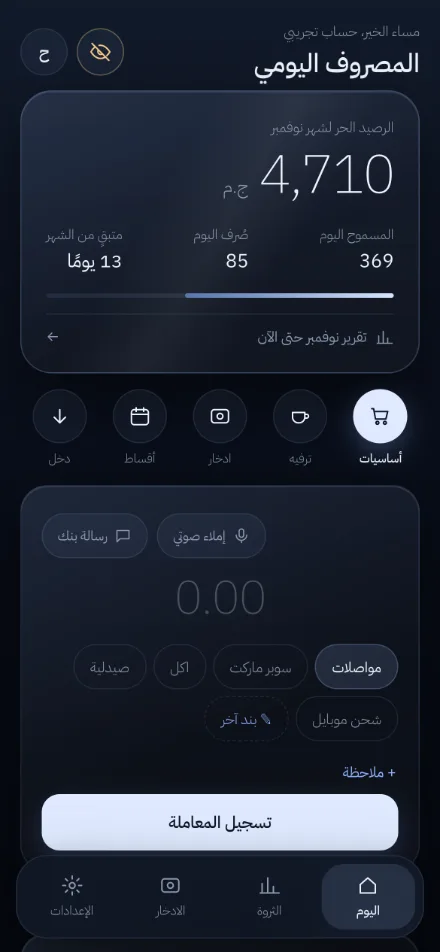
What it does
Daily allowance
Your free balance divided by the days left in the month, so you know what you can spend today.
Bank and wallet SMS
Share or paste a message from an Egyptian bank or mobile wallet; the amount, type and date are read on your phone and saved only after you confirm.
Voice entry
Say “coffee 35” in Arabic or English and it is logged.
Spending limits
Monthly limits per category or item with alerts at 80% and when exceeded.
Savings goals
Set a target and a month; see how much to save per month and per day.
Loans and debts
A ledger of money you lent or owe, with due dates and polite reminders.
Monthly report
Where the money went, compared with last month, with a shareable image showing percentages only.
App lock and privacy
4-digit PIN, fingerprint or Face ID, a button to hide amounts; no ads, no bank connection.
Install
Android
Open masroofak.com/app in Chrome and tap “Install”.
iPhone
Open masroofak.com/app in Safari, tap Share, then “Add to Home Screen”.
Computer
Open it in Chrome or Edge and use the install icon in the address bar.
Free and Pro
The free plan includes today's allowance, voice and SMS entry, spending limits, 2 savings goals, 5 open debts, this and last month's report, the app lock, and backups. Pro (49 EGP/month or 399 EGP/year at the time of writing) adds sync across devices, full history and search, the wealth and savings pages, 10 goals and 200 debts.
FAQ
Is Masroofak free?
Yes. The free plan covers daily use. Every new account gets its first month of Pro free, then continues on the free plan. Pro is optional: 49 EGP a month or 399 EGP a year (at the time of writing) for sync across devices, full history and search, and the wealth and savings pages. Payment is by InstaPay or Vodafone Cash.
How do I install it?
Open masroofak.com/app in Chrome on Android and tap Install, or in Safari on iPhone and choose Share → Add to Home Screen. There is no app-store download.
Does it connect to my bank?
No. You enter expenses yourself or share a bank SMS and confirm it. The app never reads your messages on its own.
Where is my data stored?
On the free plan, on your device (with JSON/CSV export). On Pro, it also syncs to your account, and each account can only read its own data.
Is the app in English?
Yes: Settings → Appearance and language → English. The guides and calculators on this website are in Egyptian Arabic.
Contact: masroofak2@gmail.com • Facebook, Instagram, TikTok and YouTube: @masroofakapp